Clips are inserted into the text of emails to individualize them for a particular recipient. In Action Network we most commonly use them to create the “Dear Carol,” personal salutation but there is a raft of other useful individual data we can substitute. The series of screenshots below illustrate how clips are used and provide tips on how to use them.

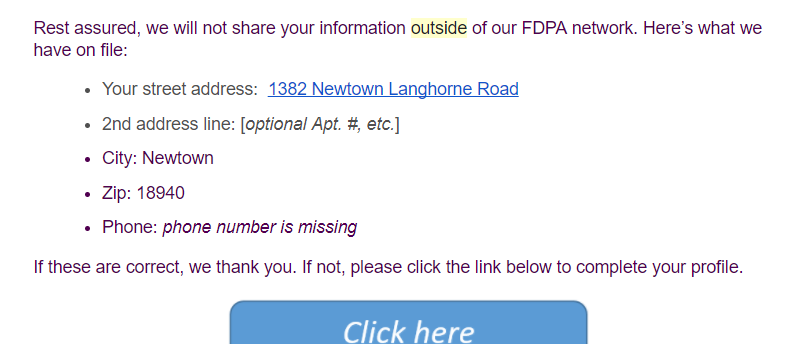
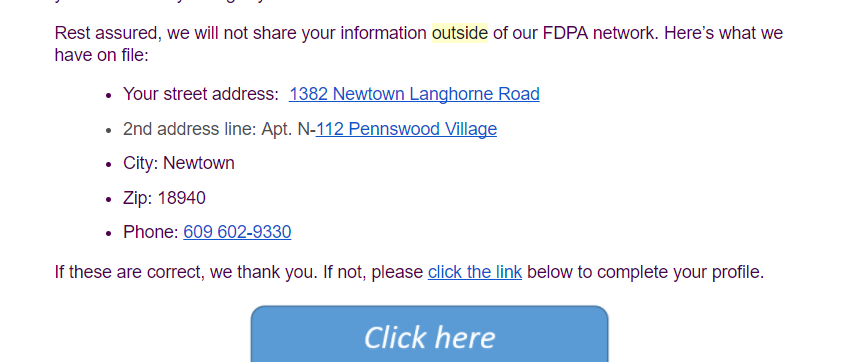
Notice that the clip begins and ends with double curly brackets. These determine what is filled in, and what is substituted when the needed information is not in our database. In the case of “Your street address,” the person’s address from his or her profile will be substituted for the clip. Or, if the address is blank in our data, the italicized phrase “street address is missing” will be displayed. Syntax, or the way you type the content between the curly brackets is important. The vertical bar, called a pipe (|), is used to divide the name of the field (Address) from the default phrase which is in between the single quotes (street address is missing).
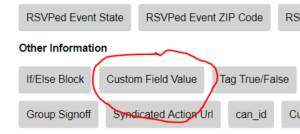 “Phone” is done slightly differently. While “Address” is a standard Action Network data field, “Phone” is a data field FDPA created — it’s a user defined field. The only syntax difference is that the field name must be in single quotes. You won’t find “Phone” listed among the choices for clips in the dropdown clips menu. You would choose “Custom Field Value” to insert the clip in your email and then add the field name in single quotes.
Here’s what the body of the email looks like to a subscriber:
For more information, please see the excellent documentation in the Action Network help pages.