I switched from Mozilla FireFox to Google Chrome because it simply works better for me with Gmail. But recently I have discovered new extensions for Chrome that make my work much easier — an unexpected dividend.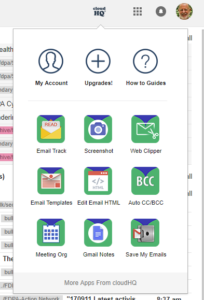
I ran across the first one when I wanted to have a simple way of sharing certain emails with a colleague at PA League of Women Voters. I use one of their credit cards to pay for print orders shipped to FDPA volunteers. By sharing the correspondence from the printer, PA LWV can verify each new charge by checking the shared Gmail folder. [… and maybe keep an eye on me to be sure I don’t run amuck!]
This and other excellent tools are available from Cloud HQ Gmail Apps. The latest offerings include one that allows you to select several emails to forward all at once to one or more people. Another lets you make a PDF copy of an email with one click. A third is a meeting scheduler that coordinates with the Google Calendar – the shared calendar used by many groups to display scheduled events and actions.
Yes, I know that learning new tech tools can be a pain, but these may be well worth your time to check them out if they help you tame the administrative work that eats at your personal “free” time. Here are some short promo video clips:
1. Multi-Email ForwardThis Chrome extension saves you a ton of time when you want to send bulk emails to anyone. Just click all the emails that you want to send, and they’ll get forwarded all at once. |
|

2. Meeting Scheduler for GmailThis Chrome extension lets you send out a link so that other people can choose a meeting time with you based on your availability. It works directly from Gmail, and is 100% integrated with your Google Calendar. Say goodbye to “email tag” for scheduling appointments – do everything with one email and one click. |
|

3. Save Your Email to PDFThis Chrome extension saves your email and its attachments as a PDF, CSV, or MS Excel. This is excellent to use for packaging email topics like: a bug that’s affecting multiple clients, all emails from 1 client in particular, or even digital receipts. You can then download the package, and neatly send it anywhere you need to. |
|
