…………..What the heck is UTF-8?
There are many different character sets that computer software uses. Although the printable alphabet and numbers may appear the same, many hidden characters and uncommon symbols differ. For example, MS Word has unique hidden characters that influence the formatting of the adjacent text.
The online world has established some character set standards to allow the accurate exchange of data, one of which is “UTF-8” or Unicode. Action Network and many other cloud-based systems require that uploads conform to this standard. So how do we ensure that the files we upload are UTF-8?
Unfortunately the answer depends on which spreadsheet program you use, and also which platform (PC, MAC, or Linux) you are using. If your upload gets rejected by Action Network, try one or more of the following procedures.
Saving as UTF-8 with Windows PC
Save your spreadsheet using the “Save-as” option. The dropdown menu offers three flavors of .CSV: choose “.CSV (msdos)”.
Saving as UTF-8 with MAC
Save your spreadsheet choosing the “.CSV (UTF-8)” option.
Saving as UTF-8 with Open Office
- Open your file (if you have an option, open it as a UTF-8 File)
- File -> Save As…
- File Type -> Choose Text CSV
- Character Set -> Choose “Unicode (UTF-8)”
- Field delimiter -> , (comma)
Saving as UTF-8 with Google Docs [as per practitest.com]
- Start by uploading the file to Google Docs. Click on the Upload menu (1) In your Google Docs account, and then choose Files from the dropdown menu.
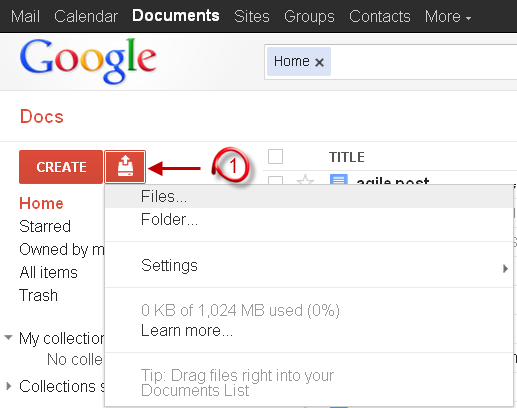
- Select the file you would like to upload. this will open the Upload Settings window.
- Make sure the first option is selected (“convert documents, presentations, spreadsheets and drawings to the corresponding Google Docs format”), and click “start upload”.
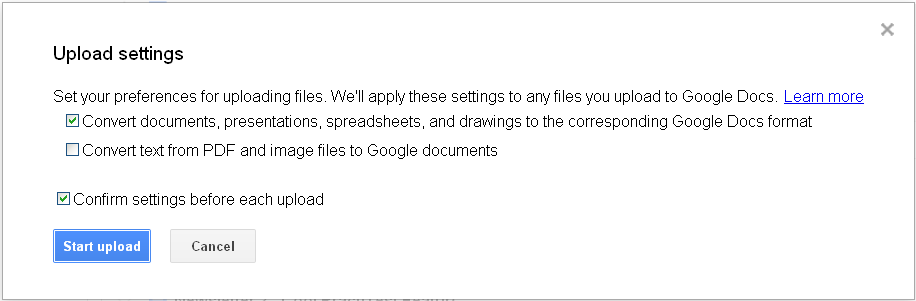
- Once uploaded, double click on the file to open it in a new window.
- Go to File –> Download As – and select CSV (notice that CSV format does not support multiple sheets in Excel).
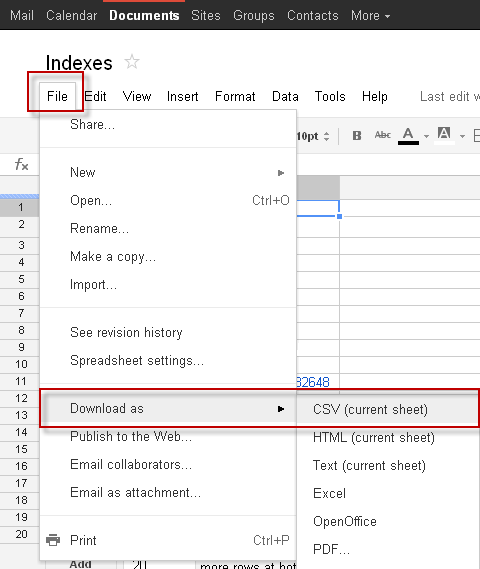
The downloaded file will be saved with UTF-8 formatting. It should work when you upload it to Action Network.