When this post first appeared, Fair Districts PA had over 10,000 subscribers. Obviously, there is cause for concern if every person using the Action Network had unrestricted access to the entire list and the information each person’s record contains. This is not the case. The amount of access provided to those with access is structured, and when properly administered, it provides appropriate limited access based upon the organizational role of the person.
Action Network Roles
Certain words are used to define the roles and relationships of persons within the Action Network.
- Subscriber – Anyone who can receive emails. (Distinct from those who have unsubscribed.)
- Activist– Anyone who interacts with the AN system by filling out a form, or taking an AN action step.
- Group– a branded entity that sponsors actions in the AN system. A group has its own name, avatar, and sends bulk emails, sponsors actions like events or petitions. Fair Districts PA is a group, as are each of the county teams.
- Partner– an individual or organization that pays for its account with Action Network.
- Network (Network Partner)- Groups linked together in a hierarchy. The “parent” partner pays for the network and the email traffic it generates. All the “child” group lists synchronize to the parent. However, child groups have no access to parent group data and can’t overwrite it unless their Group Administrator has been empowered to do so. Simply put, data flows up but not down.
- Organizer– A person with a personal AN account who has been invited to participate in a Group so as to use the group’s brand identity in organizing actions. ORGANIZERS DO NOT HAVE ACCESS TO THE GROUP’S LIST.
- Administrator– A person with a personal AN account, who has some level of access to the group’s list.
- Group Administrator– An administrator with all permissions and the role of granting permissions to others.
It’s the access to data and tools that distinguish one of the above entities from the others. Here is a screen shot of the permissions that a Group Administrator has:
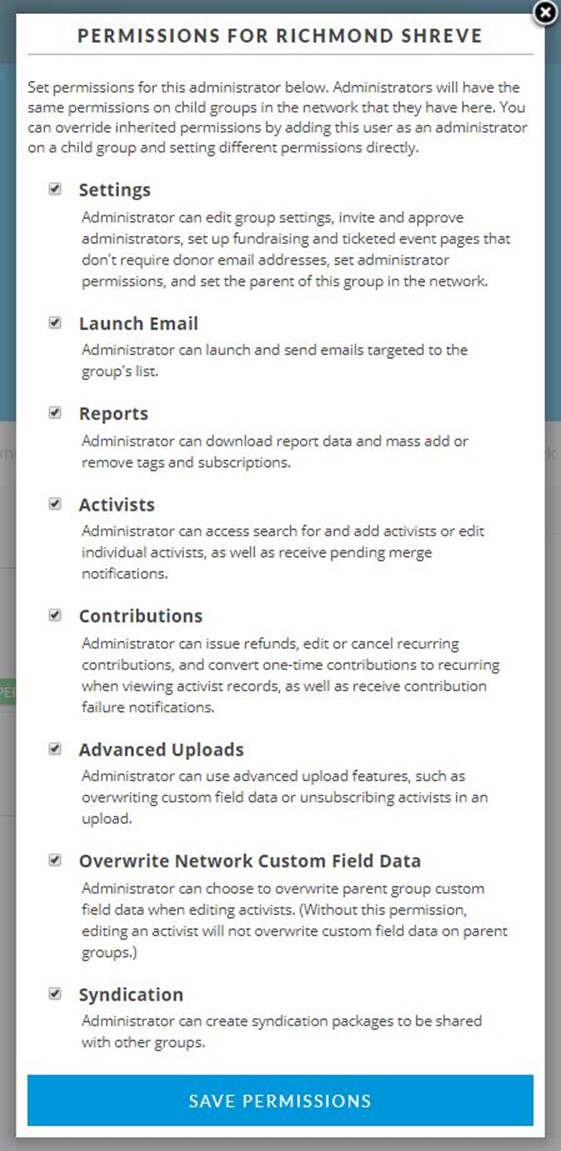
When a new group is created, its creator is the Group Administrator. As such, they can invite others to join the group. When someone accepts an invitation, they apply for a free Action Network personal account which gives them access to a personal dashboard and the basic toolset. Once participating in the group these tools may be used to create emails and actions. Since an Organizer has only their personal list to work with, they must build their list by adding the people they organize. It’s easy to imagine that a team captain would simply type in the email addresses of team members.
The Group Administrator can choose to promote any Organizer to the Administrator role and check only the permissions they need to do their job. Or, the Organizer may be given a spreadsheet with emails for selected Activists who are on the Group list. Once uploaded manually, new data for those activists automatically flows up to the Group list.
Federation
The structure outlined above is a typical hierarchy. Grass-roots volunteers often don’t fit well into a hierarchy. They aren’t employees, and they form and reform as ad-hoc teams. For example, many different individuals and environmental groups might all collaborate on a petition opposing a source of pollution. Each may jealously guard its mailing lists, but be willing to send mail on behalf of the coalition that sponsors the petition. Action Network supports such collaboration by allowing diverse Activists and Groups to participate together in a single Group sharing certain tools- such coalitions operate as federations of mostly independent participants.
Here is what the Action Network documentation says:
Organizers in your group can publish actions under your group’s brand, but they cannot access to group’s email list — only administrators get that access. So, when organizers create an action, they’ll have the option to make that action sponsored by your group. Activists who take action will then be added to the organizer’s personal email list because they created the action (unless they’ve removed themselves as a creator) and the group’s email list at the same time. This sets up a useful federated structure — you can imagine local field staff or volunteers being organizers in your group and creating their own local petitions, events, and forms under the group’s brand to help win the local campaigns they’re working on. Over time, these local organizers are building up their personal email lists, so they can easily keep in touch with their local activists. But all of those activists are also added to your group’s national email list, which you as an administrator have access to so you can keep in touch with those activists about national campaigns.
The benefit to all this is ease and efficiency. Much of the clerical drudgery and the technical complexities of administering large amounts of data is avoided.